Showing posts with label Kodak Playsport. Show all posts

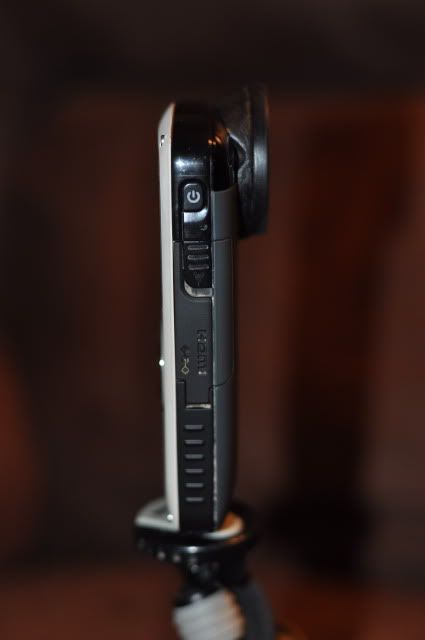
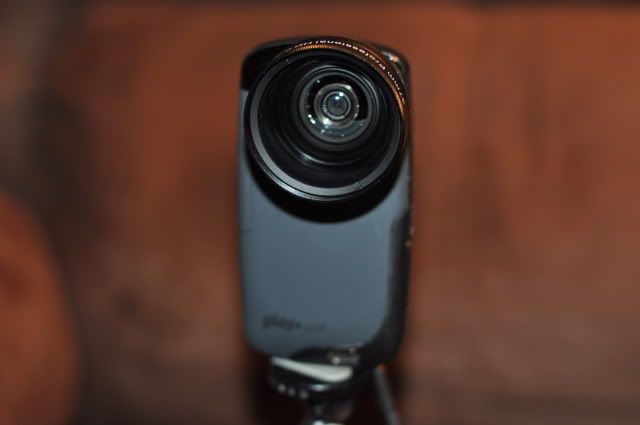
Add a Wide-Angle to Your Kodak Playsport

Modifying A Kodak Playsport

Here is a way that you can add lenses to your Kodak Playsport to create different looks.


With the Wide-Angle Lens Installed:

"It's actually very easy to do. I covered the lens and whole camera in tape while forming the puddy socket. After it dries you just pull it off and then epoxy it. It's pretty simple." - Flinginarios 

Flex Cam- Mount your camera to your bow!

The art of capturing a hunt on video is becoming very popular. Each year there is an increase of hunters that enjoy doing so. Flex Cam™ has made this art more convenient, easy and affordable. The Flex Cam™ eliminates the need for a cameraman, tapes, DVD’s or the cost of an expensive camera. All that is needed is a cel/mobile phone with the capability to record video.
Never before has the hunter been able to capture a hunt on video and send that hunt via Email or MMS Messaging to anyone, anywhere within seconds. Flex Cam™ will hold all cell phones and most video capable hand held cameras. It will also work with compact video cameras (works great with the Moultrie ReAction Cam!). Flex Cam™ will mount to any bow using the pre-existing stabilizer hole and it can also be used with most shotguns using the firearm adapter.

• Easily adjustable with just one hand
• Small and lightweight at less than 7 oz.
• Compatible with all video enabled cell phones
Save your memories and share your adventures with Flex Cam™!


Here are some example uses of the Flex Cam™:
Flex Cam™ with the Kodak Playsport


Rainy Days - We got you covered!

One thing that is hard to predict is the weather. Remember, water and condensation don't mix well with most video cameras. Therefore, it never hurts to be prepared for when the rain strikes.


On way to be prepared is by using the weather-proof Sony HXR-NX70U video camera. To make this camera weatherproof the handle with the XLR ports are detached and the camera can withstand the rain and dust. This rugged little trouper is the perfect companion for those tough location shoots where weather and climate cause lesser cameras to buckle and fold. Meeting stringent dustproof and rainproof requirements, the NX70U's sealed body keeps out all but the toughest of elements, making it ideal for outdoorsmen and hunters.


Some POV cameras can be used in the rain because they are Waterproof:


With Housing
With Housing


Now many of you already have a video camera and you don't want to shed out the $700 for an underwater housing for you camera. Fortunately, a number of companies offer solutions: Rain Covers. These rain covers are not for submerging your video camera in water. However, they offer a solution to filming in the rain.
Fits: Sony HDR-FX7, Sony HDR-AX2000, Sony HDR-FX1, Sony HXR-NX5U, Canon XH-A1/s, Canon XH-G1, Panasonic AG-HMC150, Panasonic AG-HMC40, etc.


Fits: Canon XH-A1/s, Sony HDR-FX7, Sony HDR-FX1, Sony HDR-AX2000, Sony HXR-NX5U, Canon GL2, Canon XH-G1, Panasonic AG-HMC150, Panasonic AG-HMC40, etc.


Fits Canon XF300, XF305, Sony Z5U, Sony AX2000, Sony EX1, etc.


Fits Sony HVR-Z7E, Sony HVR-Z1E/N/P, Sony HDR-FX1, Sony EX1/R, etc.


Designed for full size professional camcorders.


Designed to protect medium-size professional video camcorders.


Perfect compact rain cover for Canon XL series or the Sony EX-3 camcorder.


 Fits: Sony HDR-FX1, Sony HDR-FX1000, Sony HDR-FX7, Sony HVR-Z1U, Sony HVR-Z5U, Sony HVR-Z7U

Fits: Sony HDR-FX7, Sony HVR-V1U

Fits: Canon HF-S21A, Canon VIXIA-HF G10Canon VIXIA-HF10Canon VIXIA-HV20Canon VIXIA-HV20ACanon VIXIA-HV30Canon VIXIA-HV30ACanon XA10JVC GZ-HD5JVC GZ-HD6JVC GZ-HD7Panasonic HDC-HS9Panasonic HDC-SD5BNDLPanasonic HDC-SD9Panasonic HDC-SX5Panasonic PV-GS400Sony DCR-PC330Sony DCR-TRV940Sony DCR-TRV950Sony DSR-PD100Sony HDR-CX7Sony HDR-HC1Sony HDR-HC9Sony HDR-SR10DSony HDR-SR12Sony HDR-SR5Sony HDR-UX20


Another solutions is to move indoors into a ground blind. Here are some gear that will help get you the support and stability while filming in a ground blind:


Review of the Kodak Playsport Bundle Remote

To activate the battery in the Kodak Playsort Remote simply remove the plastic


Here are the the features of the remote:


Distance test results:
• Using the remote facing behind the Camera around the same level of the camera = 15.75 ft
• Using the remote facing in front of the Camera around the same level of the camera = 32.5ft
• Using the remote facing the side of the camera around the same level = 8.5ft

Each button does make a noise when you press it.
The zoom feature on this remote is not a steady zoom. Each click it zooms in a section at a time. Holding down the zoom button does not make it zoom in and out

GoPro vs. Playsport


Side by Side comparison on Specs
*UPDATE – GoProHD has now come out with an LCD Backpack for seeing what you are recording and for playback - Read this updated blog on the LCD BackPack

Review of the Kodak Playsport - Price $149.99

The Good: LCD screen to see what you are filming and the ability to Replay and Delete on camera.
The Bad: Waterproof depth is limited, short battery life on highest resolution and no lens protection.

Design


The Kodak playsport is roughly the size of your average cell phone. This design allows it easily to be stored in your clothes or in any other cell phone holder. 2" LCD screen on the front of the Playsport allows you to see what you are filming and allows for playback/delete right on the camera. A circular four-way direction pad houses the control for the 4x digital zoom (up & down) and you can change recording modes using the left and right. When in playback mode the up and down controls the volume and the left and right controls fast forward and rewind actions. Made of thicker plastic with grips on the side for easy hold, even while it is wet. Kodak makes no claims of the Playsport being "crush" or "shockproof", only that is it waterproof up to 9.8ft for about 30 mins at a time. Just because it is waterproof does not mean that it is feezeproof, like other cameras, it will likely not function properly when exposed to temperature less that 32ºF. The Kodak Playsport also comes with a slot that you can have a strap to put it around your neck or your hands for easy access. The lens is unprotected and is subject to scratches and dirt. In outdoor situations you must be prepared to keep the lens clean and protected. You can turn of the onboard sounds and blinking red light when filming your hunt.

There is two waterproof locking doors on each side of the Playsport. One holds the battery and sd card and the other holds a mini-HDMI port, AV port, and a non-typical USB port. Kodak saved space by using the non-typical USB port but that also means that you must have that specific USB cord to charge your Playsport. You can charge the Playsport via your computer using the USB cord (aprox 4hrs) or with the included wall charger (2hrs). When recording on the higher settings (1080p & 720p) it will drain the battery, therefore, I would recommend getting multiple extra batteries for a long day filming outdoors. 

As with any small POV camera the stability is always a concern. It does come with a built-in image stabilization, but   you can't really see the advantage. It does have the ability to attach it to a tripod plate. This allows you to capture steady footage using a Gorillapod, tripod, treearm or anything that accepts a tripod plate. 

The audio quality with the onboard microphone is going to be your typical quality with this size of camera. 
The Playsport does have the 4x Digital zoom but when using digital zoom the image quality deteriorates a little bit.
The 5 megapixel still image is great for an easy quick shot but will not replace your digital still camera.
The built-in 128MB of internal memory is a little bit deceiving due to the fact that only 20MB can be used for video/pictures and the other half is used for the built-in ArcSoft's Media Impression for Kodak software for sharing, therefore I would recommend having several SD cards (up to 32gb). The built-in software easily downloads (on PCs) and has a basic editor for trimming and cutting along with adjustment of color, contrast, brightness, underwater enhancement, dynamic lighting and denoise. The software allows for easy upload to YouTube, Facebook, Twitter, and Vimeo. You can also e-mail clips and photos. An ironic feature of the software is that it allows you to convert the video to be able to watch it on an Apple TV, iPhone, iPod and Sony Playstation/portable but you can't do the work on a Mac because the software is Windows only.

Overall, the video quality is excellent for its class of size and price but not indestructible.

Here are some sample clips:


Available in Camo Bundle
Price: $249.99


Review of the GoPro Motorsports HD Hero - Price $299.99
The Good: The GoPro captures video in a variety of different resolution and frame rates as well has a variety of still image functions. It also has a large selection of mounting options and replacement parts. The camera itself is contained in a polycarbonate shell that is submersible, shockproof and also replaceable if it takes too much of a beating.
The Bad: The lack of LCD screen makes aiming difficult and playback not an option. The small LCD menu screen is hard to operate without first learning the abbreviations from the manual.


Design


The lens boast a super wide-angle at 170º and a 127º wide-angle when filming in full 1080. The camera its self features two buttons one on top (Start/stop recording, picture taking) and on on the front of the screen (turn on and selection of options on the tiny LCD screen). The small LCD display screen is easy to navigate once you learn the symbols and abbreviations. The GoPro records to SDHC cards and you can put up to a 32gb card (important when filming in higher resolution situations) The GoPro camera houses a Lithium rechargeable battery that allows for up to  2.5 hrs of battery use. You can use the supplied mini-usb cord to charge it through a computer (2 hrs) or get the optional wall charger (1 hr). I would also recommend buying multiple additional GoPro Batteries for just $19.99 to be able to film on the long days outside.


The GoPro features a wider selection of shooting modes for both video and still photography over the Playsport.
There are five different modes to chose from in video. When you film at Full HD (1080p) (highest resolution) the video is cropped to only a 127º angle. If you want to utilize the full capability of the 170º viewing angle you can chose from 960p ("tall" mode), 720p (30 or 60fps) or at the lowest resolution of WVGA (60fps). The GoPro will shoot 5 megapixels still images, however, there are multiple shooting modes: single-shot mode captures one photo per shutter press; Per second mode (2, 5, 10, 30 or 60s) captures photos at user defined intervals; burst mode captures three photos in rapid succession and there is also a self timer mode for single shots. You can use the per second mode as a way to take still images and then speed them up in editing to give it a time lapse feel. 


The audio quality is similar to that of the Playsport, capturing monaural audio from its onboard microphone. It does however do a good job of capturing engine noises while blocking wind noise when mounted on the outside of a vehicle.


The odd shape of the GoPro makes it difficult (not impossible) to carry it in your pocket but it is small enough that it  hardly takes up any space in a backpack or bag. The big appeal of the GoPro is the wide range of cheap mounting accessories and the ability to use your imagination to design one that fits your needs. Every GoPro camera comes with the polycarbonate shell and seals with a strong plastic clamp. Once shut, the GoPro is waterproof up to 180ft (surpassing the Playsport by far) and it is also shockproof. The GoPro Motorsport package includes a PanaVise suction cup mount (used to mount to a variety of vehicle including cars, atv, etc.). It also includes an assortment of flat and curved adhesive mounts for semi-permanent attachments to helmets and to other surfaces, a pair of quick release buckles for connecting to the adhesive mounts, and a three-way pivoting arm for aiming and positioning, which gives users a fairly wide variety of mounting options right out of the box. Additional mounts including the Role Bar Mount and the Handlebar/seatpost clamp can be used to attach the GoPro to the stabilizer of your Bow. 


Or using the same mounts you can attach it to the barrel of your gun. Or for more stability you can use the Rifle Cam Mount . For all of you Waterfowl hunters out there you can get the GoPro Chest Mount and strap that to the back of your bird dog and actually capture that footage from your dogs perspective of going in the water to retrieve your birds. For those fishermen out there you can attach the GoPro to a Rode Boom Pole and get those shots of you reeling in your catch or take it overhead to get boom shots from above. 


Here are some pictures that customers have sent in how they have used the GoPro


Here is some video clips of the GoPro:


Watch around 2:08- 2:42 to see footage of the GoPro attached to a Bird Dog jumping in to retrieve.


Overall, the GoPro Camera is going to give you more options as in mounts and accessories to choose the right one for your hunting style or to adapt it for any situation whereas the Kodak Playsport will give you more options as far as the LCD viewscreen, zoom function and playback mode. If you are looking for a second angle camera that you can mount to anything and point and shot then the GoPro Camera is the way to go. If you are starting out and just looking for a way to start filming your own hunts and you want the option of being able to see what your recording then I would go with the Kodak Playsport


Comment below on what POV camera you think is right for you

Popular Posts